
Swapping BTC or ETH to SOL in Phantom Wallet


If you already use Phantom, swapping Bitcoin (BTC) or Ethereum (ETH) to Solana (SOL) inside the wallet is one way to enter the Solana ecosystem without leaving the app.
Phantom routes these cross-chain moves through its bridge flow, including routes such as BTC → SOL and ETH → SOL, as described in Phantom’s bridge documentation. For wallet setup and funding basics, see the Phantom Wallet Guide. For step-by-step allblu walkthroughs to the same destinations, see how to swap BTC to SOL and how to swap ETH to SOL.
Key Takeaways
- You can swap BTC or ETH to SOL directly inside Phantom once the Bitcoin or Ethereum network is enabled.
- Total cost can include source-chain network fees, bridge or routing fees, destination-side fees when applicable, and price impact. Review the in-app quote before confirming.
- Follow the in-app flow: enable network → select source asset → choose SOL → review quote → confirm.
- For some users, a native cross-chain swap can offer better rates or more flexibility than in-wallet routing.
Can You Swap BTC to SOL Inside Phantom?
Yes.
Per Phantom’s bridge documentation, users can enable the Bitcoin network and swap BTC directly to SOL or USDC inside Phantom.
Supported routes include:
| From | To | Pairs |
|---|---|---|
| Bitcoin | Solana | BTC → SOL, USDC |
| Solana | Bitcoin | SOL → BTC |
| Ethereum | Solana | ETH → SOL |
| Solana | Ethereum | SOL → ETH |
You can swap BTC or ETH to SOL directly in Phantom. If you already use Phantom and have a little SOL for fees, this is often the most convenient route: one wallet, one flow, no extra setup.
Bear in mind that these are cross-chain swaps, so you still wait for confirmations on the source chain (Bitcoin or Ethereum), and you pay both swap fees and network fees.
Fees and Confirmation Times
BTC → SOL and ETH → SOL inside Phantom are cross-chain routes. Applicable costs vary by route, liquidity, and network conditions.
| Fee component | What to know |
|---|---|
| Source network fee | Paid on Bitcoin or Ethereum to submit the source transaction. |
| Bridge / routing fee | Phantom says LI.FI bridge fees are typically 0.1%–0.5%, but they vary by route and liquidity. See Phantom’s bridge documentation. |
| Destination network fee | May apply when an additional destination-side transaction is required. |
| Price impact | Varies with trade size and available liquidity. |
Phantom separately lists a 0.85% fee on select same-network swap pairs. Because BTC → SOL and ETH → SOL use Phantom’s cross-chain bridge flow, do not treat 0.85% as a universal fee for the entire route. Review the final quote in Phantom before confirming. See Phantom’s swap documentation.
Phantom’s fees can change, and the displayed quote should be reviewed before confirmation. See Phantom’s terms.
For eligible same-network Solana transactions, Phantom may offer gasless routing — this is separate from BTC/ETH → SOL cross-chain routing. See Phantom’s gasless Solana documentation.
Confirmation Times
Timing depends on the source chain, route processing, and network congestion:
- BTC → SOL: Slower due to Bitcoin confirmations and miner fee variability.
- ETH → SOL: Usually faster than BTC, but delays can occur during gas spikes or route processing.
- Solana-side receipt: Once routed, SOL typically appears in Phantom quickly.
Per Phantom’s bridge documentation, total execution time is not fixed and can vary with congestion and the specific route.
Step-by-Step — Swap BTC or ETH to SOL in Phantom
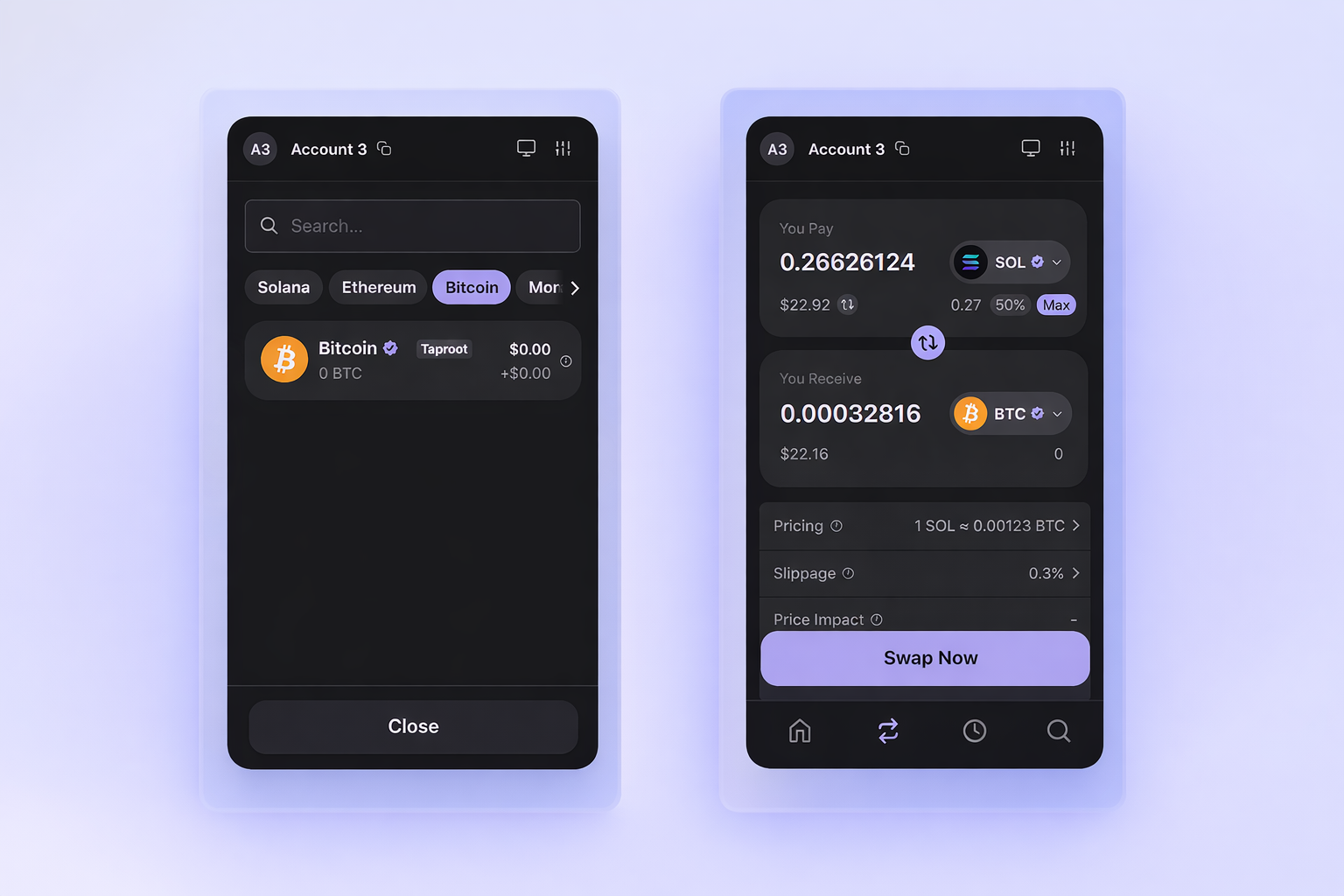
If you already hold BTC or ETH or other assets inside Phantom:
- Open Phantom.
- Select the asset you want to swap (BTC or ETH).
- Tap Swap and choose SOL as the destination.
- Review the quoted rate and total fees.
- Confirm and wait for network confirmation to complete the transaction.
- Receive SOL in your Phantom Wallet.
Important: When swapping from Bitcoin or Ethereum, you must have a small amount of the source network’s native token to cover network fees (BTC for Bitcoin transactions, ETH for Ethereum gas).
If you already keep a small amount of SOL and use Phantom regularly, swapping inside the wallet can be convenient since everything happens in one interface.
Phantom vs Allblu: Cross-Chain Swap Comparison
Instead of swapping inside Phantom, you can use Allblu for a direct cross-chain swap.
With Allblu, you can:
- Send BTC or ETH from any wallet
- Receive native SOL directly to any valid Solana address
- Review the quoted receive amount and applicable fees upfront before you send; fees are included in the quote
- Avoid enabling additional networks inside your wallet
Network confirmations on Bitcoin or Ethereum are still required, but routing and pricing are handled externally.
This approach is often preferred when:
- You are not using Phantom as your primary wallet
- You want to send directly to another Solana address
- You want a simple cross-chain quote without in-app routing layers
Explore supported routes or get a quote for BTC to SOL and ETH to SOL.
Phantom vs Allblu (Quick Comparison)
| Feature | Phantom In-App Swap | Allblu |
|---|---|---|
| Wallet Required | Phantom | Any wallet |
| Fees | Shown in Phantom before confirmation; cross-chain routes can include network, bridge/routing, and price-impact costs. | Quoted receive amount shown upfront; swap fees are included in the quote. |
| Network Fees | BTC / ETH gas required | BTC / ETH gas required |
| Destination Flexibility | Limited to supported routes | Any valid SOL address |
| Setup Required | Enable BTC / ETH network in Phantom | No wallet configuration needed |
| Best For | Existing Phantom users | Direct cross-chain swaps |
Common Mistakes to Avoid
Sending BTC directly to a Solana address
Bitcoin and Solana use completely different address formats. Sending BTC to a Solana address can result in loss of funds. Always use the correct deposit address for each network.
Ignoring the total fee stack
Swap fee, network fee, and routing premium can significantly impact total cost. Check the quoted rate and breakdown before confirming.
Not double-checking the destination address
Always copy your SOL receive address directly from Phantom and verify it matches before sending. A wrong address can mean permanent loss.
Frequently Asked Questions
Does Phantom support native Bitcoin?
Yes. Phantom supports the Bitcoin network and allows BTC swaps to supported networks including Solana. You can also swap Ethereum to SOL inside Phantom.
What fees should I expect when swapping BTC or ETH to SOL in Phantom?
You pay Phantom’s in-app fee, any routing or bridge fees, and source-chain network fees (BTC or ETH). Total cost can be higher than same-chain swaps because of confirmations and routing. Always check the quoted rate before confirming.
Is bridging the same as swapping?
No. Bridging locks assets and mints wrapped tokens on another chain. Swapping converts one asset for another and can settle in native form. See Understanding Wrapped Tokens for how they differ.
Can I get SOL in Phantom without using Phantom’s in-app swap?
Yes. You can use a native cross-chain swap to send BTC or ETH and receive SOL at any Solana address, including your Phantom wallet. Compare quotes to choose the best option.
Final Thoughts
You can swap BTC or ETH to SOL inside Phantom once the right networks are enabled, and for many users that single-wallet flow is the simplest. Cross-chain swaps still involve routing, confirmations on the source chain, and multiple fee layers, so the total cost and wait time are usually higher than a same-chain swap.
Knowing how Phantom’s in-wallet swap compares to a direct native cross-chain route helps you pick the most efficient path. For step-by-step walkthroughs, see how to swap BTC to SOL and how to swap ETH to SOL. Get a quote for your preferred route before sending funds.
Ready to swap natively?
If your goal is exchanging assets across chains, explore supported pairs or browse coins.