
Phantom Wallet Guide: Setup, Funding, Swapping, and Staking


Phantom is a non-custodial multichain crypto wallet that originated in the Solana ecosystem and remains widely used for managing Solana assets. It allows users to store assets, swap tokens, stake SOL, and interact with decentralized applications across multiple blockchains.
Because Phantom is non-custodial, you control your private keys. That also means you are responsible for securing them.
Key Takeaways
- Phantom is a non-custodial multichain wallet widely used for Solana and other networks.
- It supports token management, built-in swaps, and SOL staking.
- Phantom does not directly support fiat withdrawals.
- Understanding network compatibility is essential before sending funds.
What Is Phantom Wallet?
Phantom is a browser extension and mobile wallet that originated in the Solana ecosystem and now operates as a multichain Web3 wallet supporting Solana, Ethereum, Bitcoin, and Polygon.
As a non-custodial wallet, Phantom:
- Stores private keys locally.
- Requires a seed phrase for recovery.
- Does not control or hold your assets.
If you are new to Solana, read our Solana network overview to understand the ecosystem before using Phantom.
Installation and Initial Setup
Phantom is available as a browser extension and a mobile app. To avoid phishing, download Phantom only from the official site. Always check the address bar: the correct URL is https://phantom.app.
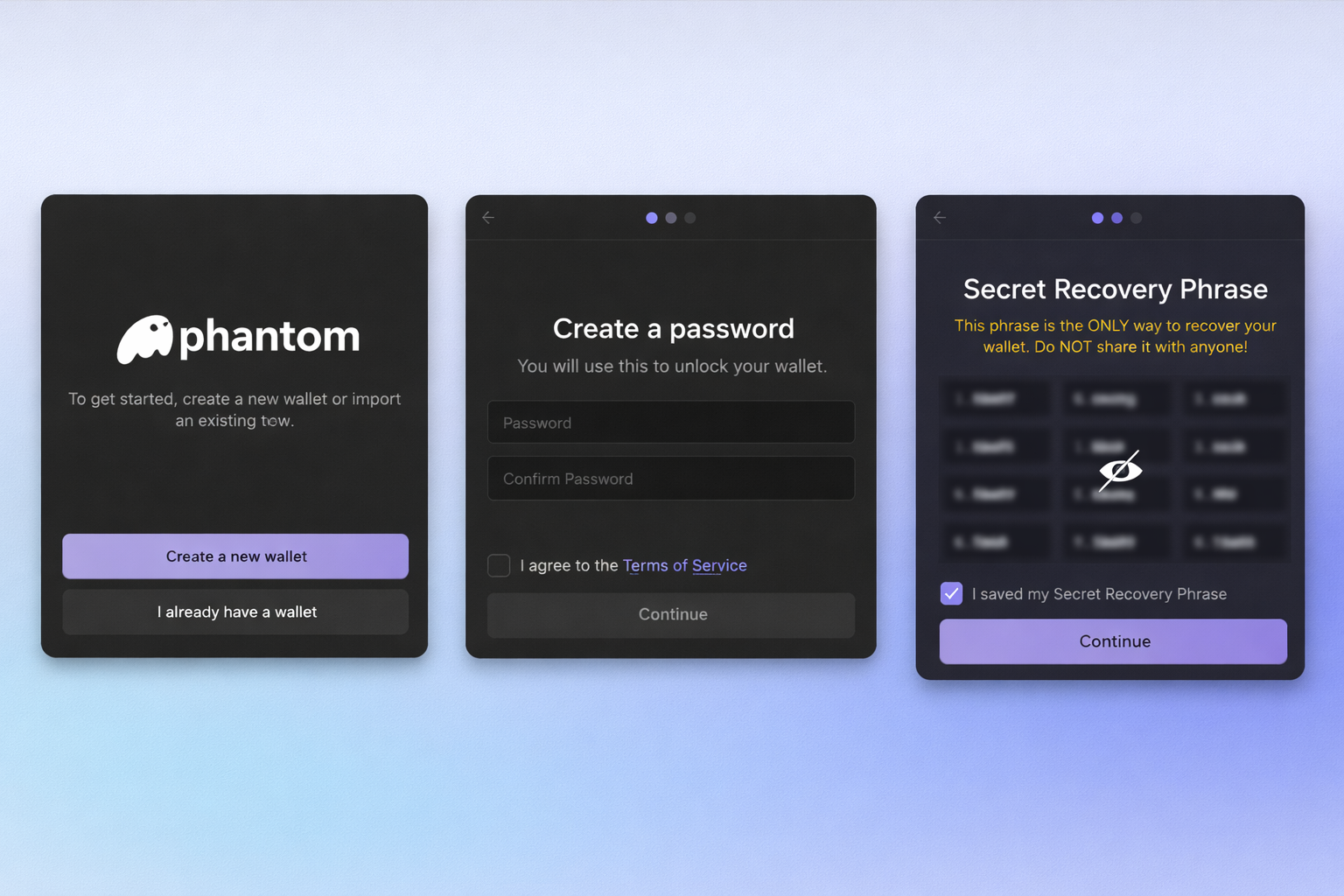
During setup you will:
- Create a new wallet
- Secure your Secret Recovery Phrase. Phantom will display a 12-word recovery phrase. This is the only way to restore your wallet if you lose access to your device. Write it down and store it offline. Never share it.
- Create a local password to unlock Phantom on this device. You will use this password each time you open the wallet here.
Important
Your Secret Recovery Phrase is the master key to your wallet.
- Anyone who has it can control your funds.
- Phantom cannot access or recover it for you.
- If you lose it, access to your wallet may be permanently lost.
Your password is device-specific. If you forget it, you can reinstall Phantom and restore the wallet with your Secret Recovery Phrase ‘I already have a wallet’.
Managing Assets in Phantom
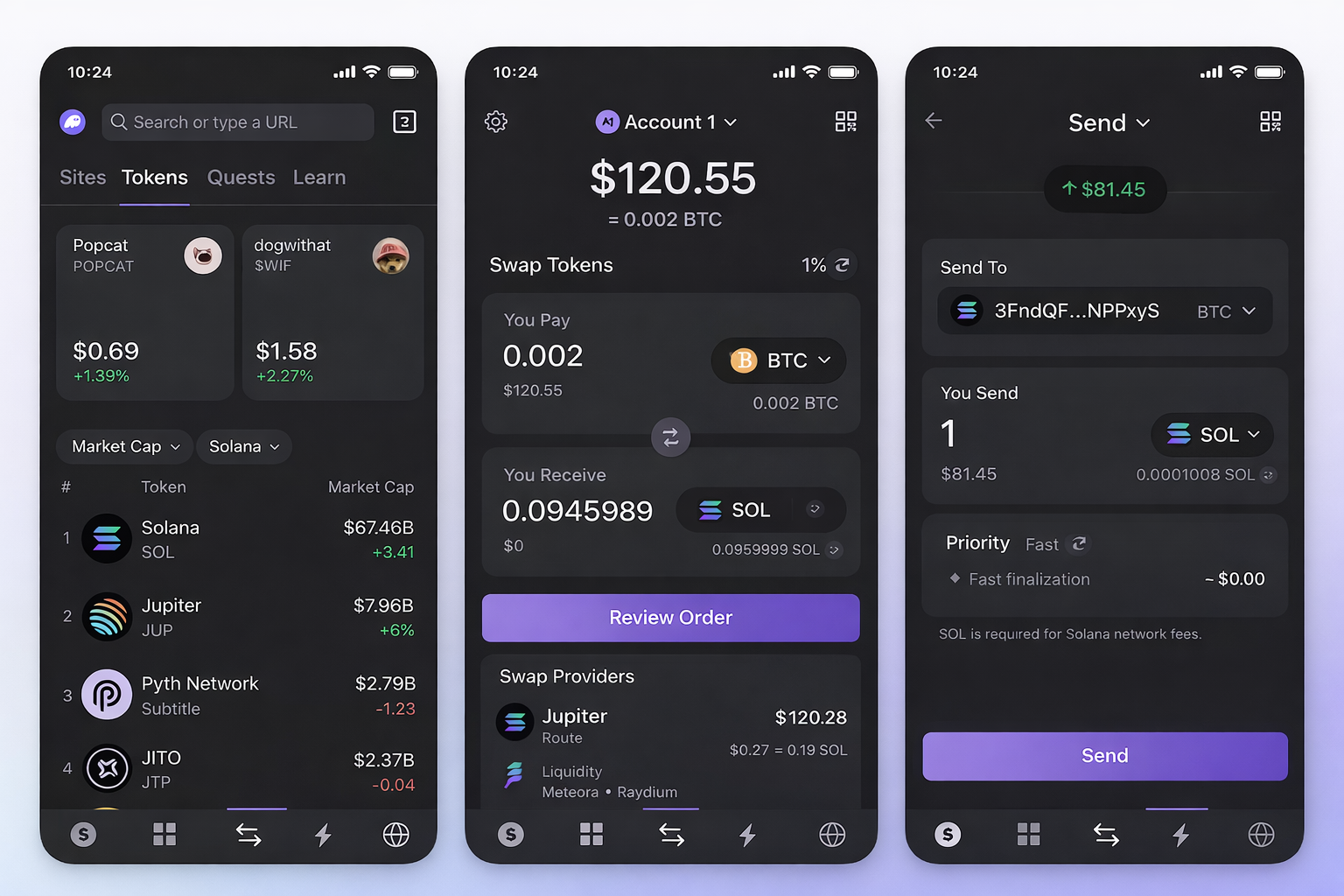
Phantom is a Web3 wallet. This means it allows you to interact directly with blockchain networks, decentralized applications (dApps), tokens, and NFTs — without relying on a centralized platform.
Originally built for Solana, Phantom has expanded into a multichain wallet supporting several major blockchains while remaining a benchmark wallet for Solana users.
Phantom displays balances for:
- SOL (Solana’s native token)
- SPL tokens (Solana-based tokens)
- NFTs
- Supported assets across additional networks
Within the wallet interface, you can:
- View token balances
- Add custom tokens
- Copy your wallet address
- Monitor transaction history
- Connect to decentralized applications
Before receiving assets, ensure:
- You are on the correct network
- The sending wallet supports that network
- The token standard is compatible
Sending assets to the wrong network can result in permanent loss.
Funding the Wallet
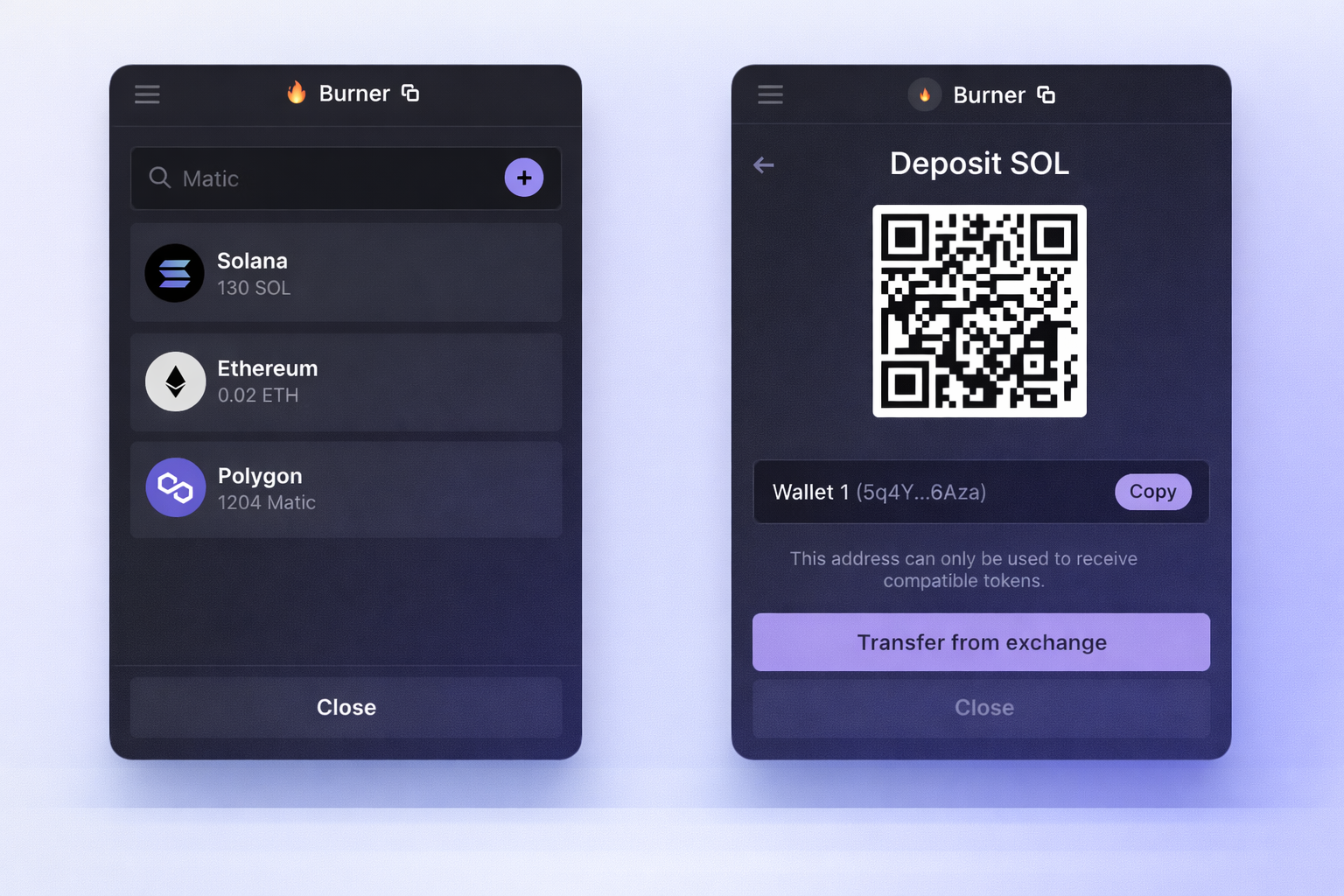
Because Solana uses SOL to pay for network fees, it is important to hold a small amount of SOL before interacting with dApps, minting NFTs, or swapping tokens.
There are two primary ways to fund Phantom with Solana.
1. Receiving Crypto
You can send SOL or SPL tokens from:
- Another wallet
- A centralized exchange
- A cross-chain swap
If you already hold assets on another blockchain — such as Bitcoin or Ethereum — you can convert them into SOL on Solana by initiating a cross-chain swap.
You can explore supported cross-chain routes to bring assets to Solana.
Always confirm you are using the correct network when sending funds and double-check your Solana deposit address.
2. Buying Crypto
Phantom integrates with third-party on-ramp providers that allow users to purchase SOL directly.
These services may require identity verification and include service fees.
If your goal is entering the Solana ecosystem from another chain, you can also:
- Swap BTC to SOL
- Swap ETH to SOL
- Swap stablecoins into Solana-native assets
This allows you to begin interacting with Solana-based applications without first depositing into a centralized exchange.
Phantom itself does not issue fiat services — it integrates external providers.
Swapping Tokens Within Phantom
Phantom includes a built-in token swap feature.
This allows you to:
- Exchange one SPL token for another
- Adjust slippage tolerance
- Review price impact before confirming
Swaps are executed using routing mechanisms that source liquidity from decentralized exchanges. These are in-wallet swaps on a single network; for moving value between different chains (e.g. Bitcoin to Solana), see how native cross-chain swaps work.
Staking Solana in Phantom
Phantom supports native SOL staking directly within the wallet interface.
Staking SOL means delegating your tokens to a validator on the Solana network to help secure the blockchain. When you delegate, you earn staking rewards generated by network inflation and transaction fees. Critically, delegating is not a transfer of ownership: your SOL remains in your wallet under your control, and the validator never has access to your private keys or underlying funds.
When choosing a validator inside Phantom, consider factors such as validator uptime, commission rates, and node reputation. Validators charge a small commission on rewards earned for operating the server infrastructure. Phantom’s built-in staking UI displays available validators alongside their commission percentages and total stake pool sizes.
Unstaking your SOL is also straightforward, but it is important to know that unstaking is not instantaneous. When you choose to unstake, your funds enter a cooling-off period until the end of the current Solana epoch (typically taking 2 to 3 days) before your tokens become liquid and spendable again in your wallet.
Withdrawing and Moving Assets
Phantom does not support direct fiat withdrawals.
To move assets out of Phantom, you can:
- Send tokens to another wallet
- Transfer to a centralized exchange
- Use cross-chain infrastructure if moving between networks
When transferring:
- Confirm the destination address
- Confirm the correct network
- Verify token compatibility
If your goal is exchanging assets across chains rather than simply transferring them, explore supported pairs on our swap page.
Fees and Transaction Costs
Using Phantom may involve:
- Solana network transaction fees
- Swap routing fees
- On-ramp provider fees
- Validator commission (for staking)
Solana network fees are typically low, but swap fees vary depending on liquidity conditions.
Always review transaction details before approving.
Security and Best Practices
Because Phantom is non-custodial:
- Your recovery phrase is the master key.
- Anyone with access to it controls your funds.
Best practices include:
- Store seed phrases offline.
- Avoid signing unknown transactions.
- Use hardware wallet integration when available.
- Double-check URLs to avoid phishing attempts.
Phantom cannot reverse transactions once confirmed on-chain.
Frequently Asked Questions
Can I swap Bitcoin or Ethereum to Phantom?
With allblu, you can swap Bitcoin to Solana or Ethereum to Solana and receive SOL directly in your Phantom wallet as a cross-chain swap.
How do I cash out from Phantom?
Phantom does not support direct fiat withdrawals. To cash out, users typically transfer assets to an exchange that supports fiat conversion.
Is Phantom Wallet safe?
Phantom is non-custodial, meaning security depends on how safely you manage your recovery phrase and approve transactions.
Can I stake SOL in Phantom?
Yes. Phantom allows native SOL staking by delegating tokens to validators directly within the wallet interface.
Conclusion
Phantom Wallet is a widely used tool for interacting with the Solana ecosystem.
It allows users to manage assets, swap tokens, stake SOL, and interact with decentralized applications — all while retaining custody of private keys.
Understanding network compatibility, fee structure, and security responsibilities is essential before using it.
Used correctly, Phantom provides a straightforward interface for managing Solana-based assets.
Ready to swap natively?
If your goal is exchanging assets across chains, explore supported pairs or browse coins.